
We measured 185 play centres and found the same thing everywhere: the busiest hour is 7pm, on every day of the week, Monday included.
That is also the hour your counter is slowest. Each admit means asking a name, spelling it, asking a phone number, picking a package, adding socks. About two minutes. With three families waiting behind.
The parent at the front is not playing yet. The parent at the back is watching a clock that has not started.
7pmthe busiest hour, every day of the week~2 mina typed admit at the counter3 digitsthe code that confirms a parent is really thereQR check-in is live. It is part of the Growth plan, and every new centre can use it during the free month. In PlayOps check-in data, 96% of check-ins are now filled in by parents on their own phones.
A second way in
QR check-in does not replace your desk. It adds a second lane beside it.
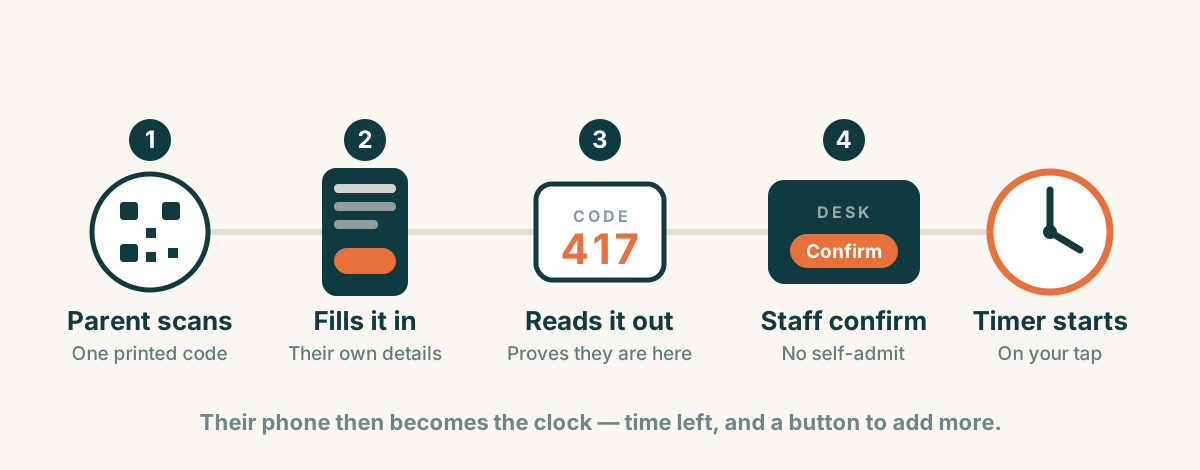
One code at your door. Printed once. A standee, or a card at the counter. It never changes, so there is nothing to reprint.
The parent scans it. Their phone opens your check-in form. Child's name, their name, their number, which package. The same things your staff type today — filled in by the person who already knows them.
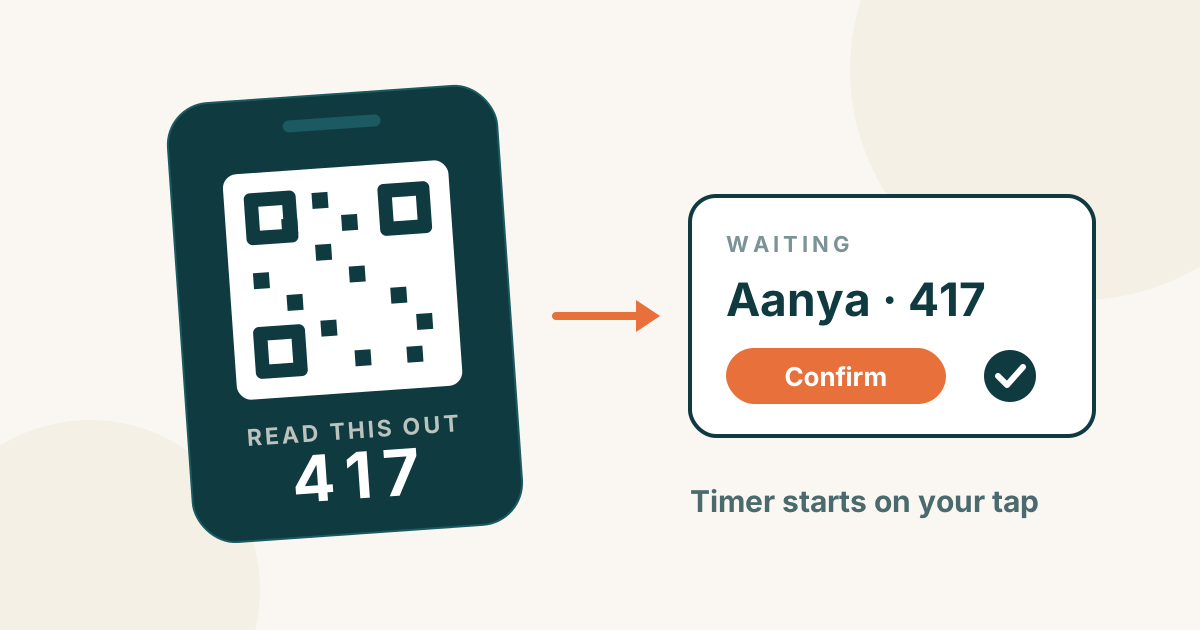
Their phone shows a 3-digit code. They read it out at the desk.
Your staff confirm. One tap. The timer starts on that tap, not on the scan.
Why a code, and not just the QR
The QR at your door is printed and public. Anyone could open that form from home, or from the car park.
The 3-digit code is the part that proves this parent is standing at your desk, now. Three digits is enough. It only works for a few minutes, only at your venue, and a person is reading it.
Your desk still decides. Nobody admits themselves. The parent fills in the form; your staff confirm it, take the payment, and receive the child in person. QR check-in moves the typing. It does not move the responsibility.
The code lasts 15 minutes — long enough to fill the form, walk in and wait behind two or three families at your busiest hour. The parent's phone shows the time left on it. If it does run out, one tap gives them a fresh code; nobody has to type their child's name twice.
Then the parent's phone becomes the clock
Once your staff confirm, that same phone page turns into a live timer.
The child's name. Time left, counting down. The finish time. And a button to add more time — so a parent who wants another half hour does not have to walk back to the counter and wait behind the next family.
Two questions leave your desk at once: how long is left? and can we stay longer?
You decide whether extending needs your approval. It is a setting per centre, and it starts switched on. A quiet Tuesday afternoon can let parents add time on their own. A full floor at 7pm should not — an extra half hour at your busiest moment means turning away the family walking in at 7:30. Your staff see the request and say yes or no.
A screen on the wall
Put an old iPad or a TV where parents sit. It shows the floor: token, first name, time left, in the same colours your staff already see.
A parent with a coffee looks up instead of walking over. Surnames and phone numbers never appear — a screen in a public café is not a customer list.
What does not change
This is the part worth saying plainly.
Your desk flow stays exactly as it is. Some parents have no smartphone. Some malls have no signal inside. On a school-holiday morning you may just want to type it yourself and get the child in. All of that still works, exactly the way it works today.
QR check-in is a second lane. The day it becomes the only way in, it is a worse product.
Money stays at the counter. No payment on the parent's phone. That part already works, and we are not touching it.
What you get out of it
The queue at 7pm gets shorter, because two families can be filling in their details while your staff confirm a third.
Your customer book gets cleaner. The parent spells their own child's name and types their own number — so the WhatsApp receipt actually reaches them, and next month's report counts the right family.
And your staff get interrupted less, by the two questions parents ask most.
And at the end, no message to send
When the child checks out, the same page turns into the receipt. Itemised, total, paid. The parent is already holding it.
Think about what that removes. Today a receipt needs a phone number typed correctly by your staff, and a staff member remembering to tap send — at the busiest minute of your day. If either slips, the family walks out with nothing. Here there is nothing to send. It is already on their screen.
Paper does not go away. If a parent wants a printed slip, print it. The change is that nobody has to message a receipt any more.
Right underneath it sits the ask for a Google review — at the one moment it actually works. Not hours later in a WhatsApp thread nobody opens, but seconds after pickup, on the phone in their hand, while the child is still talking about the slide.
And because the family is holding proof they just had a good time, that is also the best moment to show them your 10-hour pass. The sale is never easier than when the value is freshest.
What we added since
The first version — scan, code, confirm, track, extend — is live. Since then, centres asked for more, and we built it:
- A waiver inside the check-in form, with a separate yes or no for photos.
- A group waiver for parties and school trips, so a birthday group does not queue at the door.
- Staff-assisted check-in for a nanny or driver without a smartphone.
- An option not to ask returning families to sign the waiver again, until you change its wording.
Read more in our guide to digital waivers and QR check-in.